Guards and Middlewares
In this section, you will learn:
- What guards are
- How to use and configure built-in guards
- How to create custom guards
What are guards and when should you use them?
Guards are called by the GuardMiddleware middleware. They are
executed after the RouteMiddleware and before the DispatchMiddleware.
They allow your application to quickly mark a request as unauthorized.
Here is a typical Mezzio workflow with guards:
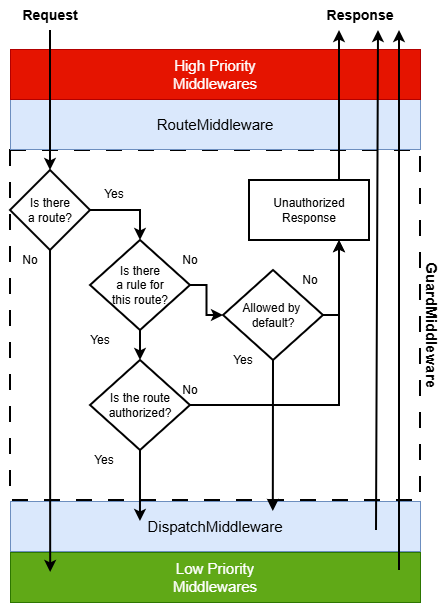
The RouteGuard guard will check based on "roles". For
instance, you may want to refuse access to each routes that begin by "admin/*" to all users that do not have the
"admin" role.
If you want to protect a route for a set of permissions, you must use RoutePermissionsGuard.
For instance, you may want to grant access to a route "post/delete" only to roles having the "delete" permission.
Note that in a RBAC system, a permission is linked to a role, not to a user.
Albeit simple to use, guards should not be the only protection in your application, and you should always protect your services as well. The reason is that your business logic should be handled by your service. Protecting a given route or controller does not mean that the service cannot be access from elsewhere (another action for instance).
Protection policy
By default, when a guard is added, it will perform a check only on the specified guard rules. Any route not specified in the rules will be "granted" by default. Therefore, the default is a "blacklist" mechanism.
However, you may want a more restrictive approach (also called "whitelist"). In this mode, once a guard is added, any route not explicitly specified will be refused by default.
For instance, let's say you have two routes: "index" and "login". If you specify a route guard rule to allow "index" route to "member" role but none for "login", your "login" route will become defacto unauthorized to anyone, unless you add a new rule for allowing the route "login" to "member" role.
You can change it in LmcRbacMezzio config, as follows:
use Lmc\Rbac\Mezzio\Guard\GuardInterface;

return [
    'lmc_rbac' => [
        'protection_policy' => GuardInterface::POLICY_DENY
    ]
];
NOTE: the deny policy will block ANY route. It is more secure, but it needs much more configuration to work with.
Authentication
Guards typically rely on the identity of the user by checking for the presence of a
Mezzio\Authentication\UserInterface attribute in the request. If there is an
authenticated identity, the guard will check if the identity has the required role(s) and permission(s).
Therefore, guards rely on an authentication middleware to be executed before them.
The Mezzio\Authentication\AuthenticationMiddleware will not fulfill the requirements
to work with LmcRbacMezzio. This is because the Mezzio\Authentication\AuthenticationMiddleware
will return a response when the request does not authenticated instead of passing the request to the next
middleware in the pipeline.
LmcAuthentication is an alternative middleware that can be used instead
Built-in guards
LmcRbacMezzio comes with two guards:
- RouteGuard : protect a set of routes based on the identity's roles
- RoutePermissionsGuard : protect a set of routes based on roles permissions
All guards must be added in the guards subkey:
return [
    'lmc_rbac' => [
        'guards' => [
            // Guards config here!
        ]
    ]
];
Because of the way Mezzio Framework handles configuration, you can without problem define some rules in one module, and more rules in another module. All the rules will be automatically merged.
Guards are executed in the order in which they are defined in the guards configuration array.
Therefore, if guards are added to the guards array in various modules, then the order will be based on
the order these modules are processed when gathering configuration data.
RouteGuard
The RouteGuard allows your application to protect a route or a hierarchy of routes based on roles. You must provide an array of "key" => "value", where the key is a route pattern and the value is an array of role names:
return [
    'lmc_rbac' => [
        'guards' => [
            'Lmc\Rbac\Mezzio\Guard\RouteGuard' => [
                'admin*' => ['admin'],
                'login'   => ['guest'],
            ],
        ],
    ],
];
The roles in a rule are checked using an OR condition.
In the example above, those rules grant access to all admin routes to users that have the "admin" role, and grant access to the "login" route to users that have the "guest" role. The "guest" role associated by default by LmcRbac when there is no authenticated identity.
The route pattern is not a regex. It only supports the wildcard (*) character, that replaces any segment.
You can also use the wildcard character * for roles:
return [
    'lmc_rbac' => [
        'guards' => [
            'LmcRbacMvc\Guard\RouteGuard' => [
                'home' => ['*']
            ]
        ]
    ]
];
This rule grants access to the "home" route to any request, authenticated or not.
Finally, you can also omit the roles array to completely block a route, for maintenance purpose for example :
return [
    'lmc_rbac' => [
        'guards' => [
            'LmcRbacMvc\Guard\RouteGuard' => [
                'route_under_construction'
            ]
        ]
    ]
];
This rule will render the 'route_under_construction' inaccessible.
Note : this last example could be (and should be) written in a more explicit way :
return [
    'lmc_rbac' => [
        'guards' => [
            'LmcRbacMvc\Guard\RouteGuard' => [
                'route_under_construction' => []
            ]
        ]
    ]
];
RoutePermissionsGuard
The RoutePermissionsGuard allows your application to protect a route or a hierarchy of routes based on permissions. You must provide an array of "key" => "value", where the key is a route pattern and the value is an array of permission names:
return [
    'lmc_rbac' => [
        'guards' => [
            'Lmc\Rbac\Mezzio\Guard\RoutePermissionsGuard' => [
                'admin*' => ['admin'],
                'post/manage' => ['post.update', 'post.delete']
            ]
        ]
    ]
];
By default, all permissions in a rule are matched using an AND condition.
In the previous example, one must have 'post.update' AND 'post.delete' permissions
to access the 'post/manage' route. You can also specify an OR condition like so:
use Lmc\Rbac\Mezzio\Guard\GuardInterface;

return [
    'lmc_rbac' => [
        'guards' => [
            'Lmc\Rbac\Mezzio\Guard\RoutePermissionsGuard' => [
                'post/manage'   => [
                    'permissions' => ['post.update', 'post.delete'],
                    'condition'   => GuardInterface::CONDITION_OR
                ]
            ]
        ]
    ]
];
Permissions are linked to roles, not to users
The rules in the above example grant access to all admin routes to roles that have the "admin" permission, and grant access to the "post/delete" route to roles that have the "post.delete" or "admin" permissions.
The route pattern is not a regex. It only supports the wildcard (*) character, that replaces any segment.
You can also use the wildcard character '*' for permissions:
return [
    'lmc_rbac' => [
        'guards' => [
            'Lmc\Rbac\Mezzio\Guard\RoutePermissionsGuard' => [
                'home' => ['*']
            ]
        ]
    ]
];
This rule grants access to the "home" route to anyone.
Finally, you can also use an empty array to completly block a route, for maintenance purpose for example :
return [
    'lmc_rbac' => [
        'guards' => [
            'Lmc\Rbac\Mezzio\Guard\RoutePermissionsGuard' => [
                'route_under_construction' => []
            ]
        ]
    ]
];
The 'route_under_construction' route will be inaccessible.
Creating custom guards
LmcRbacMezzio is flexible enough to allow you to create custom guards. Let's say we want to create a guard that will refuse access based on an IP addresses blacklist.
First create the guard:
namespace MyApplication\Guard;

use Lmc\Rbac\Mezzio\Guard\AbstractGuard;
use Psr\Http\Message\ServerRequestInterface;

class IpGuard extends AbstractGuard
{
    /**
     * List of IPs to blacklist
     */
    protected $ipAddresses = [];

    /**
     * @param array $ipAddresses
     */
    public function __construct(array $ipAddresses)
    {
        $this->ipAddresses = $ipAddresses;
    }

    public function isGranted(ServerRequestInterface $request): bool
    {
        $clientIp = $request->getServerParams()['REMOTE_ADDR']
        return !in_array($clientIp, $this->ipAddresses);
    }
}
Guards must implement the Lmc\Rbac\Mezzio\Guard\GuardInterface interface.
The isGranted method simply retrieves the client IP address, and checks it against the blacklist.
However, for this to work, we must register the newly created guard with the guard plugin manager. To do so, add the following code in your config:
return [
    'lmc_rbac' => [
        'guard_manager' => [
            'factories' => [
                'MyApplication\Guard\IpGuard' => 'MyApplication\Factory\IpGuardFactory',
            ],
        ],
    ],
];
The guard_manager config follows a conventional service manager configuration format.
The factory could look like this:
namespace Application\Factory;

use Application\Guard\IpGuard;

class IpGuardFactory implements FactoryInterface
{
    public function __invoke(ContainerInterface $container, string $requestedName, array $options = null)
    {
        if (null === $options) {
            $options = [];
        }
        return new IpGuard($options);
    }
}
Now we just need to add the guard to the guards option, so that LmcRbacMvc can execute the logic behind this guard. In
your config, add the following code:
return [
    'lmc_rbac' => [
        'guards' => [
            'MyApplication\Guard\IpGuard' => [
                '87.45.66.46',
                '65.87.35.43',
            ],
        ],
    ],
];
The array of IP addresses will be passed to IpGuardFactory::__invoke in the $options parameter.